
MCAS Family Portal
Hello Millbury families,
The state has launched a new portal for accessing MCAS results. Going forward, you should access MCAS scores through this portal, as school districts will no longer mail them. Preliminary MCAS results from spring 2026 are available and will be updated when the state makes final scores available in September. You will also see your student’s results from past years (2023–2025), if available.
This message outlines what you need to know in order to access the portal. Please follow the steps below and see the attached documentation from the Department of Elementary and Secondary Education.
Go to https://ma-millbury.myfollett.com, and log in with your Aspen account. If you need assistance logging into Aspen, please send an email to aspen-help@millburyschools.org.
From the Aspen Family Portal, click the Family side tab and locate the student-specific code in the right-hand column.
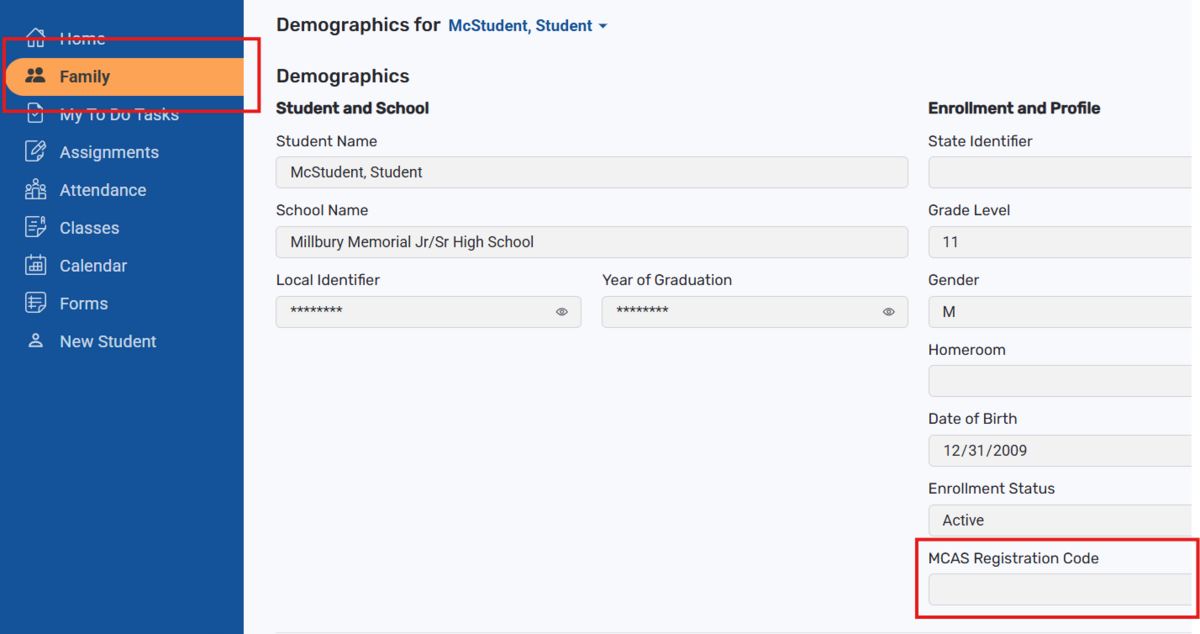
Next, go to https://mcasfamilyportal.emetric.net, and fill out the First Time Users section. To create an account, you will need your student’s registration code (that you found in the Aspen Family Portal) and your student’s date of birth.
Need Help? Check out the DESE Quick Start Guide or the MCAS Family Portal Help Guide, which shows you step by step how to create an account; add your student to your account; and view your student’s test results.